
Quick Answer
An XML sitemap is a structured blueprint of your website that lists essential URLs, helping search engines like Google discover, crawl, and index your pages efficiently. Without an XML sitemap, web crawlers may miss newly created, deep, or unlinked pages, ultimately reducing overall search visibility and organic traffic opportunities for your business.
What is an XML sitemap and why is it essential for search engine discovery?
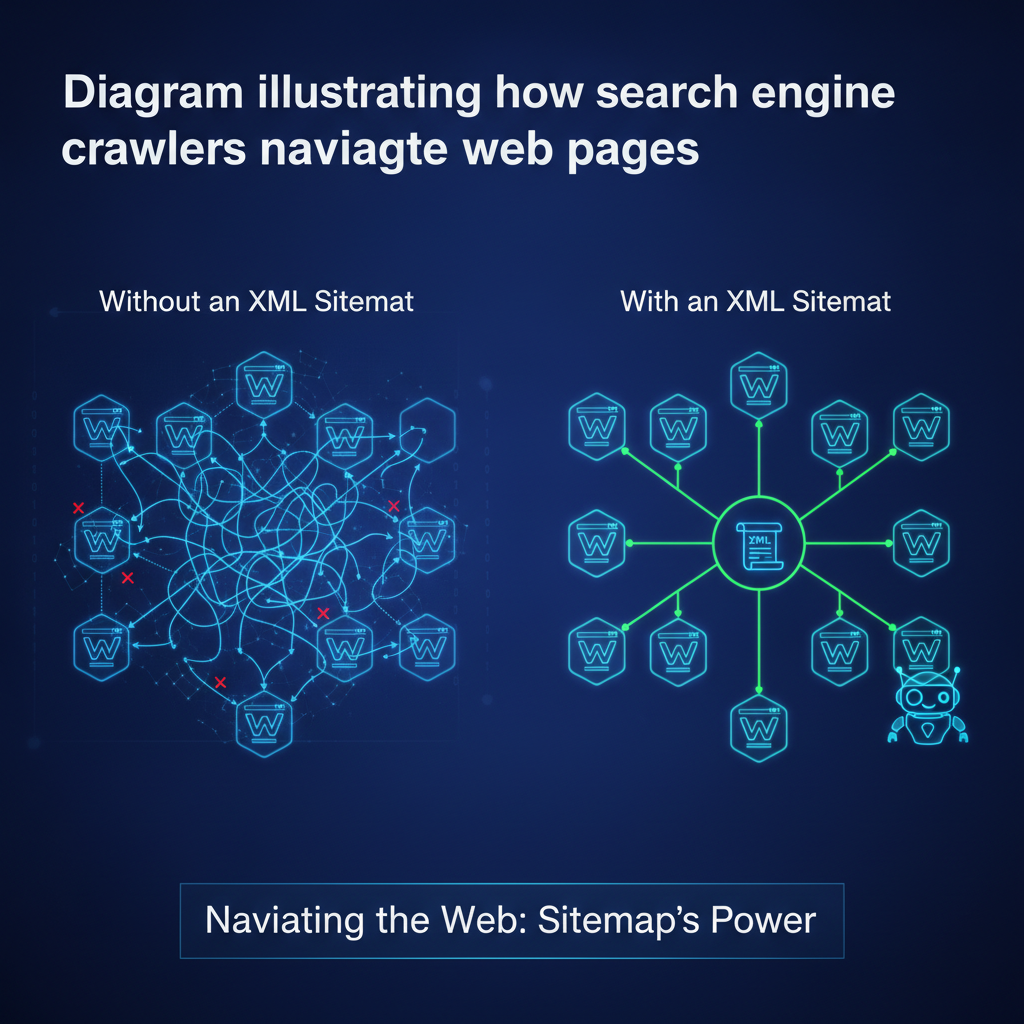
An XML sitemap (Extensible Markup Language sitemap) is a structured text file designed to communicate directly with search engine bots about the organization of your website content. Few things are more frustrating than spending hours crafting valuable content only to have search engine crawlers overlook it completely. While search engines are adept at discovering pages through traditional hyperlinking, complex site architectures, dynamic user scripts, and unlinked orphan pages frequently prevent crawlers from finding every valuable page on your domain.
By consolidating your website's canonical URLs into a standardized XML format, you ensure that search engine bots do not have to rely solely on internal links to locate critical content.
How does an XML sitemap differ from a regular HTML sitemap?
An XML sitemap is engineered specifically for search engine crawlers, whereas an HTML sitemap is built primarily for human website visitors. An HTML sitemap presents a visual, clickable directory—typically located in a website footer or subpage—to assist human users with navigation.
In contrast, an XML sitemap lives in your root server directory and uses standardized XML markup tags to transmit technical metadata directly to crawlers such as Googlebot and Bingbot.
What key information does an XML sitemap provide search engines?
An XML sitemap provides critical metadata tags that inform crawler behavior and page evaluation. According to standard sitemaps.org protocols, key XML elements include:
`
`
`
`
Documentation from Google Search Central notes that the `
📊 Page Indexing Success Rate by Page Depth (2024 Audit Data)
How do XML sitemaps maximize your site's crawl budget?
An XML sitemap maximizes your crawl budget by guiding search engine bots directly to high-value, indexable URLs, preventing bots from wasting finite scanning resources on unneeded or redundant site paths.
What is crawl budget and why does it affect large websites?
Crawl budget is the total number of pages search engine crawlers will inspect on a single website during a given timeframe before exiting. Crawl budget is determined by two main factors: crawl rate limit (how rapidly server responses allow crawlers to scan without degrading site loading performance) and crawl demand (how popular, authoritative, and frequently updated your domain is).
For e-commerce stores, real estate listings, media publishers, or sites with thousands of dynamic URLs, crawl budget constraints can lead to search engines indexing only a portion of published pages during a scan cycle.
"Without a clean XML sitemap guiding crawler prioritization, search engines can consume up to 45% of a domain's allocated crawl budget evaluating low-value URLs, faceted navigation filters, and outdated server redirects."
What common signals cause search crawlers to miss key pages?
Search crawlers routinely miss critical web content when technical structural signals are absent. Common obstacles include:
Orphan Pages: Content lacking internal links from any other accessible page on your domain.
Javascript Content Rendering: Content rendered dynamically via scripts that search crawlers cannot easily parse during initial discovery.
Deep Hierarchy: Pages buried four or more clicks away from the homepage.
Faceted Navigation: Extensive URL parameter variations that confuse crawler priority logic.
How do you build and submit a sitemap to Google Search Console?
Building and submitting a sitemap requires generating a structured XML file adhering to core standards and registering its location within search engine webmaster platforms.

What does a clean sitemap.xml example look like?
A standard sitemap.xml example follows strict formatting rules to ensure search engine parsers can read it without errors. Below is a validated structure containing standard metadata tags:
```xml
```
How do you complete a sitemap submission in Google Search Console step-by-step?
Executing a sitemap submission in Google Search Console registers your file path directly with Googlebot for background processing:
- 1Log in to your Google Search Console account.
- 2Select your verified property from the domain navigation menu.
- 3Click 'Sitemaps' under the Indexing section in the left navigation menu.
- 4Enter your sitemap URL path (such as `sitemap.xml` or `sitemap_index.xml`) into the "Add a new sitemap" input field.
- 5Click 'Submit' to complete the registration.
💡 Tip
Automate your XML sitemap generation through your content management system or custom backend logic. Dynamic sitemaps automatically append new URLs and update `<lastmod>` timestamps whenever content changes, eliminating manual maintenance.
📉 Organic URL Indexing Acceleration Post-Submission
What common XML sitemap mistakes delay page indexing?
Common XML sitemap errors degrade crawling efficiency and can delay content indexing for weeks after publication.
Why shouldn't non-indexable URLs be included in your sitemap?
Including non-indexable URLs—such as pages returning 404 errors, 301 redirects, or pages containing a `` tag—creates conflicting instructions for search engine bots. When Googlebot encounters non-indexable pages in a file designed to highlight canonical content, it reduces trust in your sitemap quality and can reduce crawl frequency across your domain.
How often should your XML sitemap be updated?
An XML sitemap should update dynamically whenever content is created, modified, or deleted. For active websites, real-time dynamic updating ensures search engine engines are notified immediately of fresh content; for smaller websites, weekly updates are usually sufficient to maintain index alignment.
Give Every Page You Create the Audience It Deserves
Building great digital experiences takes real time, care, and dedication. Leaving whether Google finds your hard work up to chance can feel discouraging, but a well-structured XML sitemap puts control back in your hands. If you want expert eyes on your technical SEO architecture to ensure search engines index every piece of content seamlessly, reach out to our team today for a comprehensive sitemap and indexing review.
