

Quick Answer
Google Tag Manager is a free tag management system that enables businesses to deploy and manage marketing and analytics code snippets on their website without modifying source code. Most active digital businesses need Google Tag Manager to simplify marketing tracking, improve site speed, and streamline conversion tracking across multiple channels efficiently.

What Is Google Tag Manager and How Does It Work?
Google Tag Manager (GTM) is a centralized tag management system that serves as a user-friendly intermediary between your website and external tracking software. Instead of manually editing your website's source code every time you launch a new ad campaign or analytics tool, GTM allows you to add, update, and manage code snippets—known as tags—from a single web interface.
In practice, website tag management replaces dozens of individual tracking scripts with a single container script. When a visitor loads your webpage, the container script communicates directly with your GTM setup to determine which specific tags should run based on user actions.
What is a GTM container and how does it store code?
A GTM container is a small JavaScript snippet installed across every page of your website that acts as a secure digital vault for all your tracking code. Within the container, three main components work together to gather and transmit data:
Tags: The actual code snippets provided by platforms like Google Ads, Facebook, or LinkedIn that send information to third-party services.
Triggers: The specific rules or user conditions that dictate when a tag should execute (e.g., when a user clicks a "Submit" button or views a specific page).
Variables: The dynamic data parameters—such as page URLs, click IDs, or transaction totals—that tags and triggers need to evaluate conditions and measure activity accurately.
What is the difference between Google Tag Manager and Google Analytics?
Google Tag Manager is a data collection tool, whereas Google Analytics is a data analysis platform. GTM does not store, report, or visualize website performance data on its own; its sole responsibility is to trigger scripts and pass custom event information to target destinations.
Conversely, platforms like Google Analytics 4 (GA4) receive that incoming data, organize it into reports, and provide insights into user behavior, conversions, and traffic acquisition.
Centralizing code tags through a single management container eliminates code bloat and ensures consistent, audit-ready data collection across every digital marketing channel.
🥧 Typical GTM Container Tag Distribution
What Are the Core Benefits of Tag Management for Growing Businesses?
Implementing a dedicated tag management system offers significant improvements in operational speed, data governance, and overall site stability. Based on real-world implementations, organizations migrating to structured tag management routinely reduce tracking deployment timelines from weeks to minutes while keeping site architecture clean.
How does tag management improve website load times and security?
Tag management improves page performance by firing external scripts asynchronously, meaning third-party tools load alongside your website rather than forcing visitor web browsers to pause page rendering.
From a security perspective, centralized analytics tag management mitigates compliance risks by establishing a single point of entry for site scripts. Instead of having unmonitored snippets scattered across various site templates, security and development teams can audit, restrict, or revoke third-party data tracking from a single dashboard.
How does Google Tag Manager simplify conversion tracking across channels?
Google Tag Manager simplifies conversion tracking by allowing businesses to create modular triggers that feed multiple advertising channels simultaneously.
For instance, rather than building separate tracking codes for every ad network, you can establish one universal "Form Submission" trigger within GTM. That single trigger can instantly send event notifications to your Google Ads conversion tag, Meta Pixel, and CRM system at the exact moment a lead completes an action.
📈 Average Deployment Time per Marketing Tag
Does Your Business Actually Need Google Tag Manager?
Determining whether your business requires Google Tag Manager depends primarily on your current technology stack, team workflow, and marketing goals. While simple websites can operate without it, growing organizations quickly find GTM indispensable.
When is direct code implementation sufficient for a business?
Direct code implementation is sufficient for basic, low-complexity websites that rely solely on standard web analytics without custom tracking requirements. If your site only requires a baseline installation of GA4 and does not utilize paid advertising, dynamic retargeting, or custom form tracking, hardcoding the main tracking script into your site header or using a trusted content management plugin is often completely adequate.
When should a company migrate to a tag management system?
A company should migrate to Google Tag Manager as soon as it runs paid ad campaigns, tracks custom user engagement events, or relies on multiple marketing tools.
You should consider implementing GTM if your business:
- 1 Employs multi-channel digital marketing analytics: You run paid campaigns on platforms like Google Ads, Meta, LinkedIn, or TikTok.
- 2 Requires granular conversion tracking: You need to measure specific micro-conversions, such as link clicks, video views, scroll depth, or form abandonments.
- 3 Lacks immediate developer availability: Your marketing team needs the autonomy to deploy marketing tag implementation quickly without waiting for development sprint cycles.
- 4 Prioritizes data privacy compliance: You need precise control over script behavior based on user consent management preferences.
How Do You Implement Google Tag Manager on Your Website?
Deploying Google Tag Manager follows a structured, step-by-step process designed to maintain website security and data consistency.
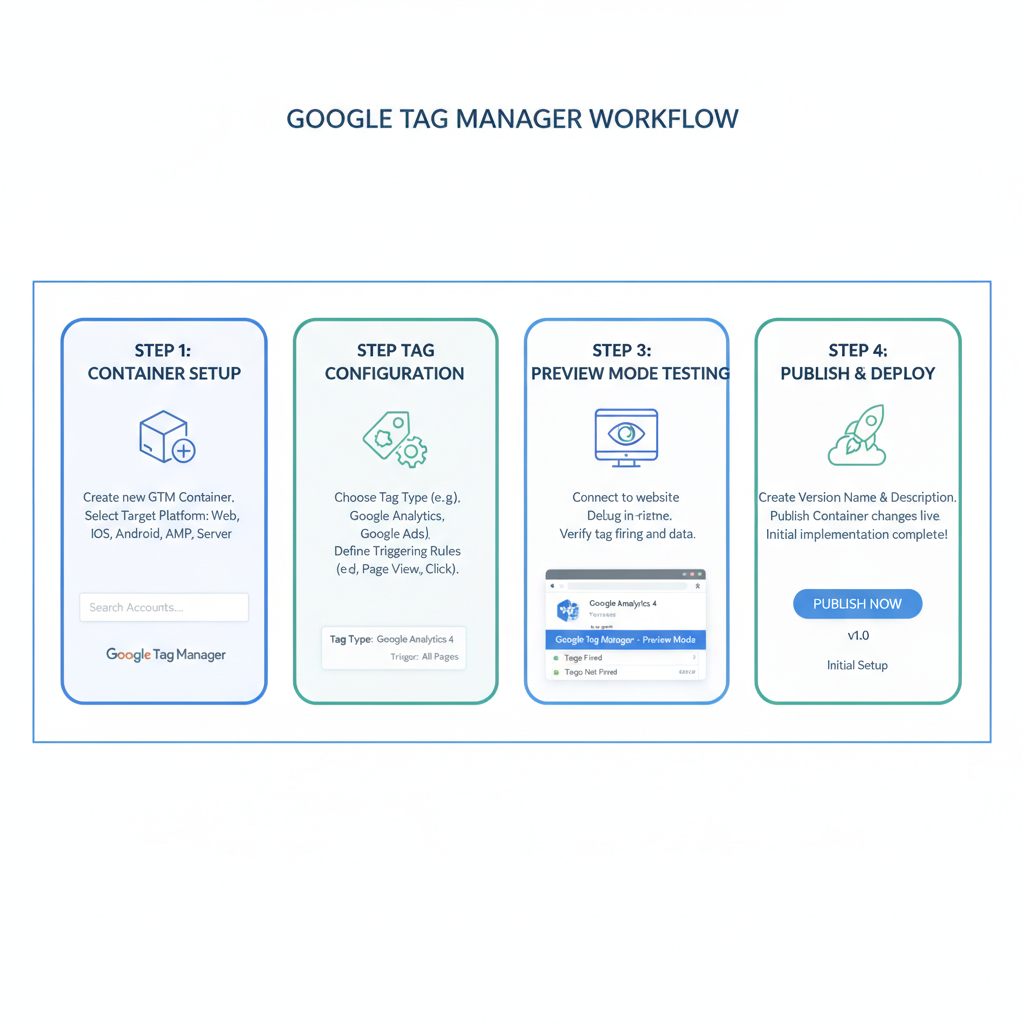
Step 1: Create a GTM account and container
Begin by establishing an account on the official Google Tag Manager platform using your company's master Google account. Once created, establish a Web container named after your primary domain.
Step 2: Install the container code on your site
Google Tag Manager will provide two code fragments upon container creation. Copy and paste the top JavaScript snippet high into the `
` tag of every webpage on your site. Next, paste the secondary `