

Quick Answer
Learning how to get more google reviews requires a systematic strategy combining direct requests, automated review invitations, and seamless digital access points. Businesses can increase google reviews by timing requests post-purchase, deploying email and SMS outreach, placing QR codes on physical collateral, and consistently responding to all customer feedback.
A steady stream of authentic online reviews is one of the most powerful catalysts for local business growth. When potential customers search for services or products in their area, customer feedback acts as digital word-of-mouth marketing, directly impacting buying decisions and brand perception. Establishing a structured framework to collect customer feedback consistently builds organic search prominence, strengthens online visibility, and establishes market trust.
Understanding the mechanics of customer sentiment collection allows organizations to turn satisfied buyers into brand advocates. Implementing a multi-channel campaign ensures every customer touchpoint offers a straightforward opportunity to leave feedback on your Google Business Profile.
Why Are Google Business Reviews Critical for Business Growth?
Google business reviews serve as both a primary local ranking factor and a decisive trust signal for modern consumers. Search engines prioritize profiles with fresh, high-volume, and positive feedback because these metrics reflect real-world customer satisfaction and relevance.
```
+-----------------------------------------------------------------------+
| GOOGLE BUSINESS REVIEW IMPACT CYCLE |
+-----------------------------------------------------------------------+
| [ Higher Review Volume & Ratings ] ---> [ Improved Local Map Rank ] |
| ^ | |
| | v |
| [ Higher Customer Trust & Sales ] <--- [ Increased Organic Clicks ] |
+-----------------------------------------------------------------------+
```
How Do Google Reviews Impact Local SEO and Search Rankings?
Google reviews directly influence local search rankings by signaling business activity, prominence, and customer trust to search engine algorithms. According to local search ranking factors studies, review signals—including review quantity, velocity, and diversity—account for approximately 15% of the ranking algorithms for the Google Local Map Pack.
When a Google Business Profile receives regular reviews containing relevant keywords, search engines index these terms as trusted third-party validation of the business's offerings. Consequently, businesses with proactive feedback strategies frequently outrank competitors who possess older profiles but stagnant review volumes. Additionally, high star ratings increase click-through rates (CTR) from search results, sending strong user-engagement signals back to search engine bots. For guidelines on managing business listings, consult Google Search Central documentation.
What Role Do Online Reviews Play in Buyer Decision-Making?
Online reviews function as social proof, heavily reducing purchase anxiety for prospective clients during the evaluation stage. Research indicates that over 87% of consumers read online reviews for local businesses before making a purchase or scheduling a consultation, with a minimum requirement of a 4.0-star rating for many buyers.
"Consumer trust is no longer established purely through brand messaging; it is earned through transparent, recent, and authentic experiences shared by peer buyers."
Buyers evaluate customer feedback not only to gauge overall quality but also to assess how a company handles operational challenges. Profiles that demonstrate recent, steady reviews reassess trust faster than businesses with dozens of outdated reviews from previous years.
📈 Impact of Review Volume on Local Conversion Rates (Industry Benchmark)
What Is the Most Effective Google Review Strategy?
The most effective google review strategy relies on capturing customer sentiment at the moment of maximum satisfaction through simplified digital workflows. Converting happy customers into reviewers requires removing friction from the submission process and systematically asking at key operational milestones.
When Is the Ideal Time to Ask for Google Reviews?
The ideal time to ask for google reviews is immediately following a successful service delivery, product delivery, or milestone achievement when customer satisfaction peaks. Requesting feedback while the positive experience is fresh in the client's mind increases conversion rates significantly.
In practice, optimal request windows vary slightly by industry:
Home Services & Contracting: Immediately upon job completion, while the technician or project lead is still on-site.
Professional Services (Legal, Finance, Marketing): Right after delivering a key project milestone, winning a favorable result, or presenting a positive performance review.
E-Commerce & Retail: Between 24 to 48 hours after product delivery, allowing sufficient time for the customer to unbox and use the item.
Hospitality & Dining: Shortly after payment processing or checkout while the experience remains memorable.
How Can Automated Workflows Scale Review Generation?
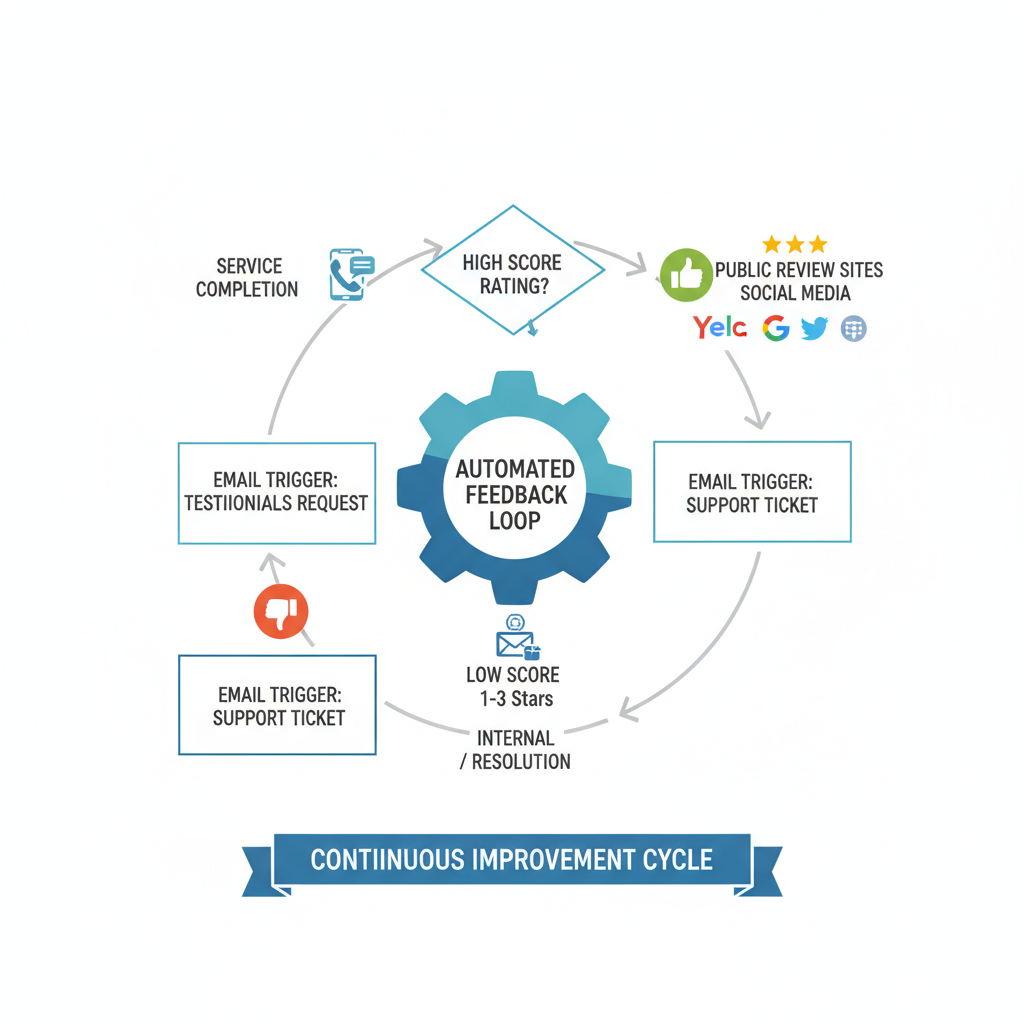
Automated workflows scale review generation by integrating Customer Relationship Management (CRM) triggers directly with email and SMS communication tools. Automation ensures that every client receives a prompt invitation without relying on manual employee intervention.
A standard automated review collection sequence incorporates:
- 1 Transaction Event Trigger: A CRM tag (e.g., "Invoice Paid" or "Service Completed") initiates the automated workflow.
- 2 Initial Communication (Within 2 to 24 Hours): An SMS or email is dispatched featuring a personal tone and a direct link to the review page.
- 3 Follow-Up Sequence (Day 3 or Day 5): A gentle reminder is sent exclusively to contacts who did not open or click the initial link.
- 4 CRM Status Update: Once a link is clicked, the contact tag updates to prevent over-solicitation.
Automated SMS campaigns consistently achieve open rates near 98%, making text messaging one of the highest-converting channels for review acquisition when executed with customer consent.
How Do Short Links and QR Codes Simplify the Process?
Short links and QR codes simplify the review process by routing users directly to the star-rating modal on your Google Business Profile, reducing the submission steps from five clicks to one.
To generate a direct review link:
- 1 Log into the account managing your Google Business Profile.
- 2 Search for your business name on Google to open the Business Profile Manager dashboard.
- 3 Select Ask for reviews to display your unique, condensed URL (e.g., `https://g.page/r/[UNIQUE_ID]/review`).
- 4 Convert this URL into a high-resolution QR code using dynamic code generation software.
Displaying these QR codes on counter displays, receipts, business cards, vehicle wraps, and digital invoices allows offline customers to scan and review using their mobile devices within seconds.
How Should Businesses Formulate an Ask for Google Reviews?
Formulating an ask for google reviews requires clear, concise language that emphasizes how brief the process is and how much your organization values honest customer input. Direct, transparent requests generate higher response rates than indirect or overly complex appeals.
What Scripts and Templates Work Best for Verbal Requests?
Verbal requests succeed when staff members link their ask directly to positive customer comments expressed during normal conversation. Equipping employees with conversational scripts empowers them to ask for google reviews naturally without feeling intrusive.
Consider these scenario-based verbal templates:
Scenario A: After a customer expresses direct praise
Staff: "Thank you so much! We are thrilled to hear you had such a great experience. As a local business, our reputation depends on word of mouth. Would you be open to sharing that exact feedback in a quick Google review?"
Scenario B: At service closure or checkout
Staff: "It was a pleasure working with you today! We strive to deliver five-star service every time. If you have 60 seconds today, leaving us a review on Google would mean the world to our team."
💡 Tip
Always inform the customer where the link is located—for instance, "I'll text you a link right now," or "You can scan the QR code right here on the counter." Clear direction reduces drop-off rates.
How Do You Draft Effective Email and SMS Review Templates?
Effective email and SMS templates prioritize brevity, personalize the message, and place the direct call-to-action (CTA) link prominently above the fold.
#### Email Outreach Template
```
Subject: How did we do, [First Name]?
Hi [First Name],
Thank you for choosing [Company Name] for your recent [Service/Product]. We hope we exceeded your expectations!
As a small business, public feedback helps us continuously improve and helps other local consumers make informed choices.
Could you take 60 seconds to share your experience on Google?
[Button/Link: Leave a Quick Google Review]
Thank you for your support!
Best regards,
[Sender Name/Company Name]
```
#### SMS Request Template
```
Hi [First Name], thanks for choosing [Company Name] today! Could you take 1 minute to leave us an honest Google review? Your feedback helps us immensely: [Direct Link]. Text STOP to opt out.
```
What Are the Key Rules and Policy Constraints for Google Reviews?
Maintaining compliance with Google's Maps User Contributed Content Policies is mandatory to prevent profile suspensions, review removals, or legal penalties under federal consumer protection laws.
What Is Review Gating and Why Is It Prohibited?
Review gating is the practice of filtering customers through a pre-screening question (e.g., "Were you happy with your service?") and directing satisfied users to a public review site while funneling dissatisfied users to an internal private feedback form.
Google explicitly prohibits review gating. Guidelines state that merchants must not selectively solicit positive reviews or discourage negative reviews from customers.
Violating this policy can result in Google retroactively removing thousands of accumulated reviews from a profile. Furthermore, regulatory bodies such as the U.S. Federal Trade Commission (FTC) enforce heavy fines against organizations practicing deceptive review manipulation, including:
Incentivizing Reviews: Offering discounts, gift cards, free products, or contest entries in exchange for leaving reviews.
Conflict of Interest: Paying employees to write positive reviews or hiring third-party agencies to generate synthetic reviews.
On-Site Review Stations: Setting up kiosks or shared Wi-Fi networks dedicated to collecting reviews on premises, which triggers Google’s automated spam filters due to duplicate IP addresses.
How Should Businesses Handle Negative or Fake Reviews?
Handling negative reviews requires a calm, professional public response strategy, while fake or fraudulent reviews should be flagged formally for policy violation removal.
When dealing with legitimate negative feedback:
- 1 Respond Promptly (Within 24 Hours): Publicly acknowledge the customer's experience without becoming defensive.
- 2 Apologize and Take Ownership: Validate their concern, even if the issue stemmed from a misunderstanding.
- 3 Move the Conversation Offline: Provide a direct phone number or email address to resolve the matter privately.
```
[Negative Customer Review Received]
|
v
Is it a real customer experience?
/ \
(Yes) (No / Fake)
/ \
[Public Professional Response] [Flag Review via Profile Manager]
[Offer Offline Resolution] [Submit Evidence to Google Support]
```
For clearly fake, abusive, or competitor-generated reviews, business owners should navigate to the review inside Google Business Profile Manager, select Report Review, and choose the relevant violation reason (e.g., Spam, Conflict of Interest, or Profanity). If Google declines the initial request, business owners can appeal through the Google Business Profile Help Forum with supporting documentation.
📊 Consumer Trust Benchmark by Star Rating (2024 Survey)
How Do You Track and Measure Google Review Performance?
Measuring google review performance requires tracking operational key performance indicators (KPIs) over time to ensure acquisition strategies deliver consistent rating stability and organic local search growth.
Which Metrics Best Measure Review Acquisition Success?
To evaluate the health of an online reputation management strategy, organizations must analyze four core metrics:
- 1 Review Volume: The total count of verified reviews on the Google Business Profile.
- 2 Review Velocity: The rate at which new reviews are published monthly. Steady velocity signals to search algorithms that the business remains active.
- 3 Average Star Rating: The aggregate aggregate score across all reviews. Aiming for an average score between 4.5 and 4.8 stars provides optimal trust, as consumers often view a flawless 5.0 as untrustworthy or manipulated.
- 4 Response Rate: The percentage of reviews answered by management. Best practice dictates responding to 100% of reviews—both positive and negative.
How Does Review Velocity Influence Local Search Visibility?
Review velocity—the frequency and consistency with which a profile acquires new reviews—acts as a dynamic real-time credibility metric for search engines. Acquiring 50 reviews in a single day followed by six months of inactivity creates an unnatural review profile that triggers spam filters and signals waning business popularity.
Conversely, a business that consistently earns 3 to 5 detailed reviews per week demonstrates ongoing operational health. Search engines continuously recalculate local rank based on these signals, rewarding active profiles with higher placements in local map results.
Key Takeaways for Review Strategy Execution
Establishing an effective framework to increase google reviews requires strategic timing, frictionless requests, and unwavering policy compliance:
Ask Promptly: Request reviews at the point of maximum customer satisfaction post-sale or post-service.
Eliminate Friction: Use shortened direct URLs and dynamic QR codes across all digital and print customer collateral.
Automate Solicitations: Connect CRM events to automated SMS and email sequences to ensure consistent customer outreach.
Comply Fully: Avoid review gating, compensation, or on-site review stations to protect your profile from Google penalties.
Engage Consistently: Respond professionally to all reviews to signal active account management and strong customer service standards.
