
Quick Answer
Google ads negative keywords are specific search terms you exclude from your advertising campaigns to prevent your ads from showing on irrelevant queries. Adding negative keywords stops wasted ad spend, lowers your cost-per-click, and ensures your budget targets only high-intent potential customers who are ready to buy.
Running a Google Ads campaign without negative keywords is like pouring water into a leaky bucket. You might be getting clicks, but if half of those clicks come from people searching for free tutorials, job openings, or completely unrelated products, you are paying top dollar for traffic that will never convert.
In practice, this simple setting is the single most overlooked optimization tool in digital marketing. Most small business owners set up their ad groups, select a few target keywords, enter their credit card information, and let Google run wild. But Google’s default settings are designed to capture broad matching search intent, which means your ads frequently trigger for queries that have zero commercial value for your business.
What Are Google Ads Negative Keywords and How Do They Work?
Google ads negative keywords are target terms you set within your campaign to explicitly prevent your ads from triggering when a user's search query contains those words. By defining what you don't want to bid on, you gain precise control over your ad placement and audience targeting.
When someone performs a search on Google, the platform evaluates your target keywords against the search query. If you use standard match types (like broad match or phrase match), Google serves your ad on related searches, synonyms, and variations. A negative keyword acts as a hard boundary. If a user’s query contains a word on your negative list, Google automatically suppresses your ad from that auction.
What is the primary function of a negative keyword?
The primary function of a negative keyword is to filter out unqualified ad impressions and clicks before they cost you money. By preventing your ads from appearing on non-converting searches, you protect your daily budget and reserve your ad spend exclusively for high-intent prospects who are looking to purchase your specific product or service.
What are the different match types for negative keywords?
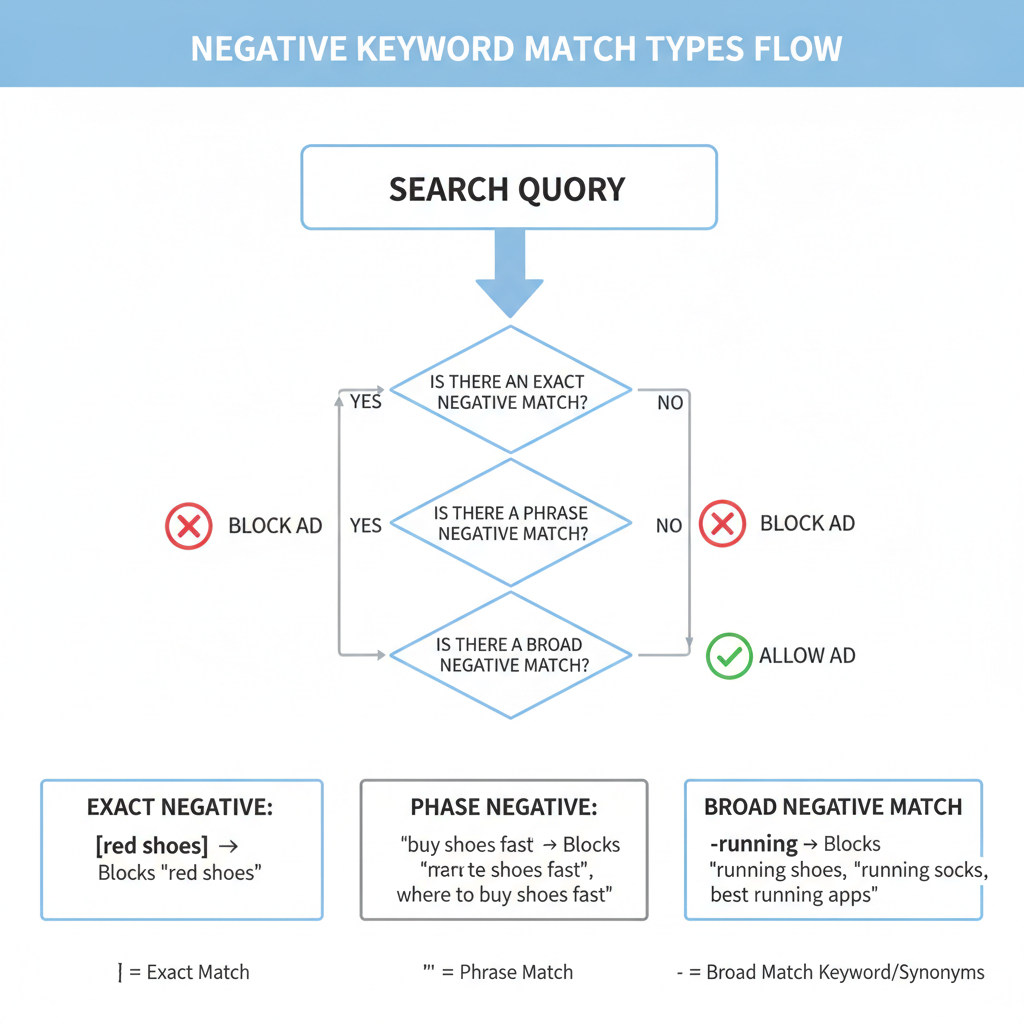
Just like standard targeting keywords, negative keywords utilize match types to determine how strictly Google filters searches. Understanding these distinctions is critical to avoiding accidental blocking of good traffic:
Negative Broad Match: Your ad will not show if the search query contains all your negative keyword terms, even if the words appear in a different order. However, if the query contains only some of the words, your ad may still display.
Negative Phrase Match: Your ad will not show if the search query contains the exact negative keyword terms in the exact same order. Additional words can come before or after the phrase.
Negative Exact Match: Your ad will not show only if the search query contains the exact negative keyword terms in the exact order, with no extra words before or after.
🥧 Ad Spend Allocation Without Negative Keywords (Typical Small Business)
Why Is Adding Negative Keywords Crucial for Small Business Budgets?
Adding negative keywords directly impacts your bottom line by eliminating wasted ad spend and boosting overall campaign efficiency. For small businesses operating with lean marketing budgets, every dollar saved on an irrelevant click is a dollar redirected toward a paying client.
Based on real-world account audits, small business campaigns operating without negative keyword lists waste anywhere from 20% to 50% of their monthly budget on irrelevant queries. Eliminating this waste immediately increases your return on ad spend (ROAS) without requiring additional capital investment.
How do negative keywords improve your Click-Through Rate (CTR) and Quality Score?
Negative keywords improve your Click-Through Rate (CTR) by ensuring your ads are only shown to users whose search intent aligns with your offer. When your ads stop appearing for irrelevant searches, fewer people see your ad and scroll past it, which drives up your CTR.
According to Google Ads Help, CTR is one of the most critical components of your Quality Score—a 1-to-10 rating Google assigns to your keywords evaluating ad relevance and landing page experience. Higher Quality Scores lower your actual Cost-Per-Click (CPC) and earn your business better ad positions at lower costs.
"Pruning irrelevant search traffic through regular negative keyword audits can reduce acquisition costs by up to 30% while simultaneously lifting Quality Scores across active search campaigns."
💡 Tip
Quick Win for New Campaigns: Create a universal negative keyword list right out of the gate. Add generic non-commercial terms like "free," "cheap," "jobs," "careers," "salary," "code," "DIY," "download," and "pdf" before your ads go live.
How Do You Find and Implement Negative Keywords in Google Ads?
Finding effective negative keywords requires analyzing real historical search data inside your advertising dashboard. Rather than guessing what users are typing, you can rely on exact user search queries logged by Google.
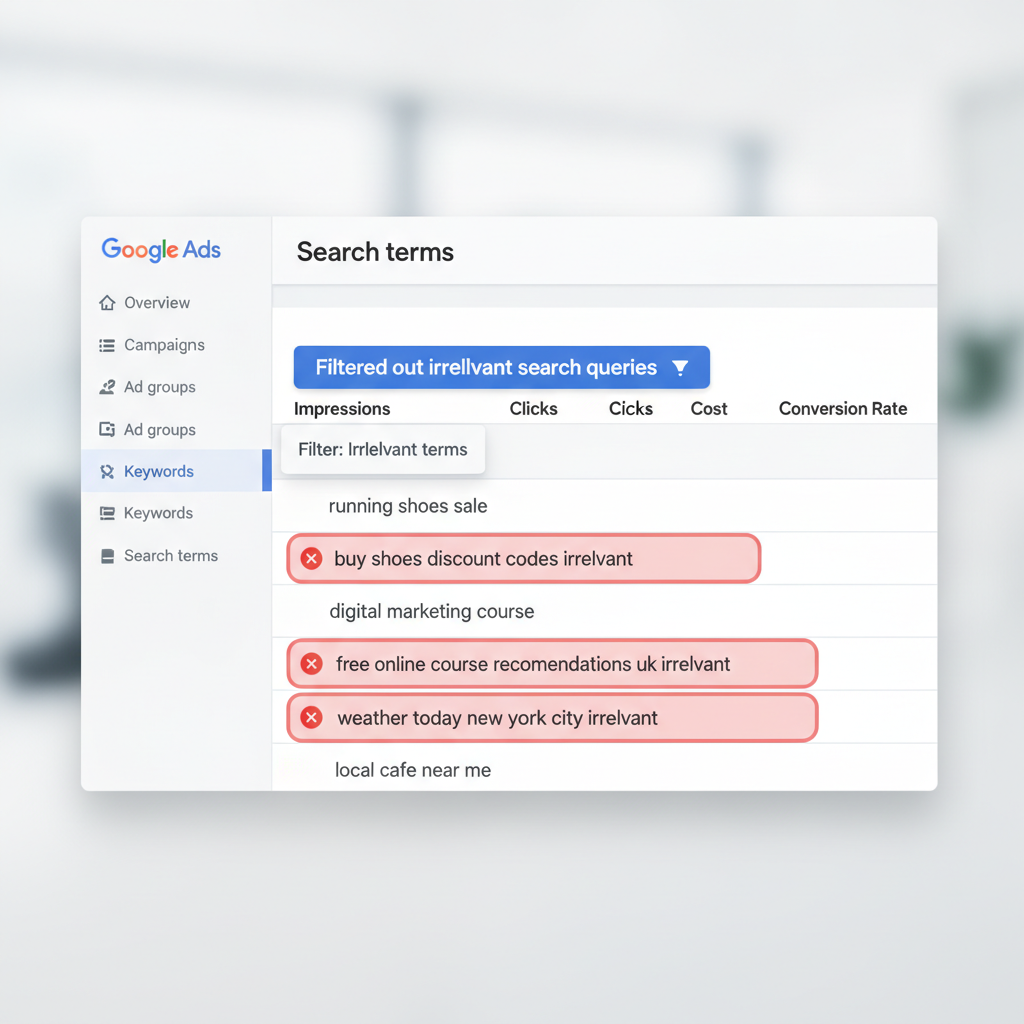
Where do you find negative keyword candidates in your account?
You locate candidate terms by reviewing the Search Terms Report within your Google Ads account interface. This tool shows the exact queries people typed into Google before clicking on your ad.
To access it, navigate to Campaigns > Insights & Reports > Search Terms. Sort the list by total clicks, spend, or lowest conversion rate. Scan down the query list and identify any search phrases that do not match your commercial offerings.
What is the step-by-step process to add negative keywords?
Follow these four steps to build and maintain an active negative keyword strategy:
- 1 Extract Unrelated Terms: Open your Search Terms Report weekly and mark the checkboxes next to queries that represent unqualified intent or unrelated services.
- 2 Select Target Scope: Click "Add as negative keyword" at the top of the report table. Choose whether to apply the term at the Ad Group level, Campaign level, or to a reusable Negative Keyword List.
- 3 Define Match Type: Edit the word syntax. Add quotation marks around the term for phrase match (e.g., `"free software"`) or brackets for exact match (e.g., `[free software]`).
- 4 Save and Monitor: Save your choices and review performance data over the following two weeks to verify that relevant impressions remain steady while wasted clicks decline.
📊 Campaign Metric Improvements After Implementing Negative Keywords
What Are the Common Pitfalls to Avoid With Negative Keywords?
While negative keywords are powerful, mismanaging them can inadvertently hurt your paid search performance. Setting rules that are too strict can suppress legitimate, conversion-ready search traffic.
Can negative keywords accidentally block relevant traffic?
Yes, negative keywords can accidentally block relevant traffic if you apply single-word broad match negatives without careful consideration. For instance, if a residential roofing company adds the broad match negative keyword `"repair"` because they only want to install new roofs, they will also block profitable searches like "best roofing repair contractor near me" or "emergency roof repair replacement."
To prevent over-blocking, favor negative phrase match or negative exact match for multi-word phrases instead of single-word broad negatives.
What is the difference between campaign-level and account-level negative lists?
Campaign-level negative lists apply rules exclusively to one specific campaign, which is ideal when running separate campaigns for different service lines or locations. Account-level negative lists apply rules globally across every search and shopping campaign in your entire account. Use account-level lists for terms that should never trigger any of your ads under any circumstance (such as job seeker keywords or illegal search terms).
Summary of Key Takeaways
Mastering Google ads negative keywords is one of the highest-return activities any small business marketer can perform. By establishing routine account maintenance, you lock down wasted spend and elevate your entire campaign ecosystem.
Protect Your Budget: Negative keywords prevent ads from showing on non-converting, irrelevant searches.
Audit Regularly: Review your Search Terms Report at least once a week to spot newly trending bad queries.
Match Types Matter: Use phrase and exact match negatives to avoid accidentally suppressing valuable customer traffic.
- Boost Account Metrics: Eliminating junk traffic elevates your CTR, improves Quality Score, and lowers your effective Cost-Per-Click.
