
Quick Answer
Ad extensions, officially called Google Ads assets, are free account enhancements that display additional business information—such as phone numbers, sitelinks, and pricing—alongside standard search ads. Implementing relevant ad extensions typically increases click-through rates by 10% to 15% while improving Ad Rank and Quality Score without increasing your cost-per-click.
Managing a digital advertising budget effectively requires maximizing every square pixel of search engine real estate. Many business owners and marketing professionals mistakenly focus solely on bids and keywords, missing out on one of the most powerful free upgrades available in pay-per-click (PPC) marketing: ad extensions.
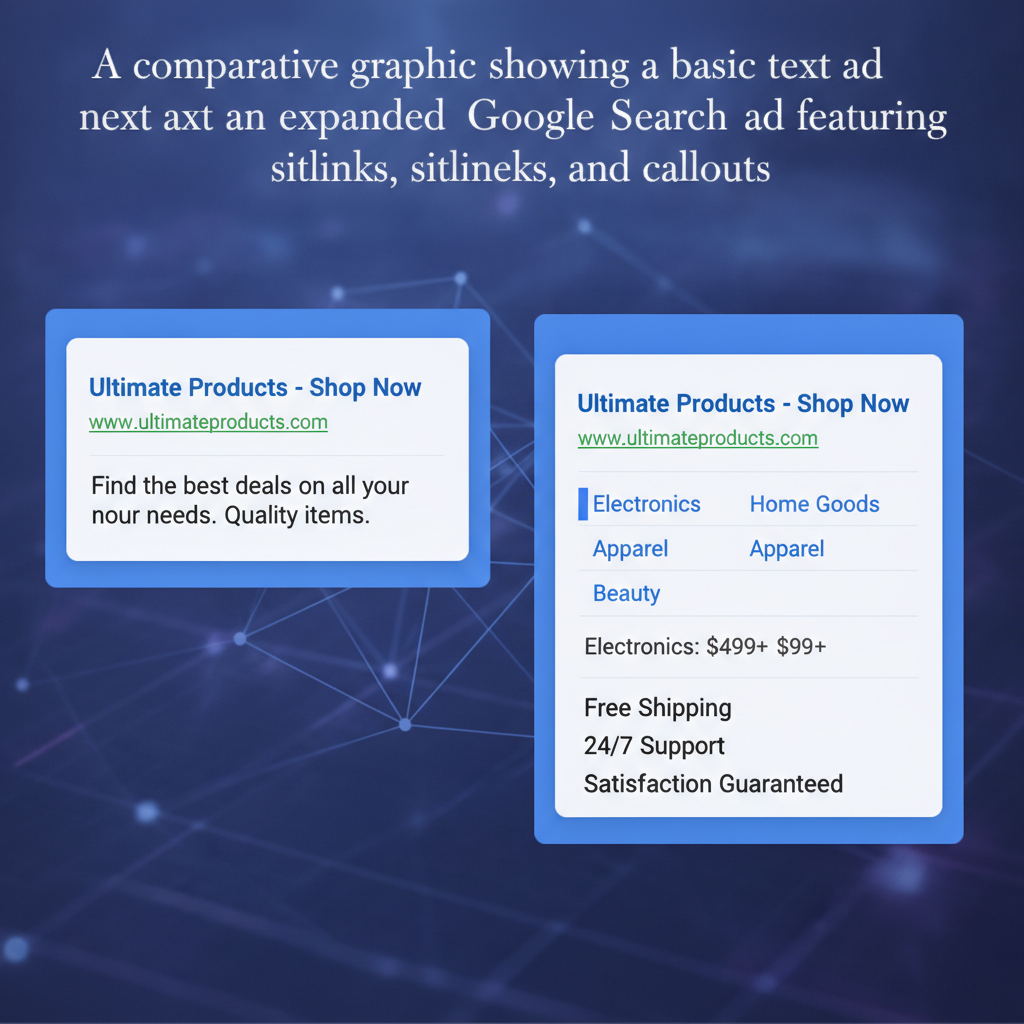
Formally renamed as Google Ads assets, these extensions elevate standard search ads into comprehensive dynamic information centers. By providing users with direct paths to specific pricing, services, locations, and promotional offers, you create a frictionless experience that builds immediate trust before a customer even clicks.
What Are Google Ads Assets (Ad Extensions) and Why Are They Essential?
Google Ads assets are visual and structural additions to standard text ads that display supplemental business details, direct links, and actionable contact options. They are essential because Google incorporates asset performance and expected click-through rate into its overall Ad Rank calculation, meaning ads using high-quality assets rank higher at a lower relative cost.
In practice, search engines reward ads that deliver the best user experience. When you provide clear choices—such as instant direct phone calls, immediate pricing charts, or direct navigation to specific product pages—users find what they need faster. This elevated relevance translates directly into higher engagement and better performance metrics across your entire campaign ecosystem.
"Deploying four or more relevant assets across your search campaigns expands your ad footprint on the Search Engine Results Page (SERP), effectively capturing more visual attention from qualified buyers without increasing your base keyword bid."
How do ad extensions improve Click-Through Rate (CTR) and Quality Score?
Ad extensions improve Click-Through Rate (CTR) by making your ad visually larger and providing specific, relevant choices that align with consumer search intent. When your ad's CTR increases, Google's auction algorithm views your ad as more relevant to the user's query, which directly boosts your Quality Score.
A higher Quality Score reduces your actual cost-per-click (CPC) while maintaining or improving your ad position. Based on real-world search campaign data, accounts that implement a full suite of relevant extensions google ads features consistently see a CTR uplift between 10% and 15%. This structural improvement ensures that your ad budget works significantly harder for your business.
📊 Average CTR Lift by Google Ads Asset Type
What are the costs associated with implementing extensions in Google Ads?
There is no upfront media cost to add extensions to your Google Ads account; creating and enabling them is completely free. You only pay standard cost-per-click charges when a user actually interacts with your ad or asset, such as clicking a sitelink, tapping a phone call button, or opening a direct location link.
For instance, if a user clicks a sitelink leading directly to a specific product service page instead of the main headline, you are billed the exact same CPC rate as a regular headline click. Automated assets generated by Google's systems also follow this identical cost model, ensuring total spend transparency.
Which Google Ads Assets Deliver the Highest Return on Investment?
The Google Ads assets that deliver the highest return on investment are sitelinks, callout assets, structured snippets, and specialized extensions like call and price extensions. Selecting the right combination depends on your business model, customer journey, and conversion targets.
To construct a comprehensive campaign strategy, marketing teams should combine account-level foundational assets with targeted campaign-specific additions. Combining general brand extensions with intent-driven features yields the best user experience and highest conversion efficiency.
📈 Mobile Conversion Rate by Asset Combination
How do Google Ads price extensions drive qualified high-intent traffic?
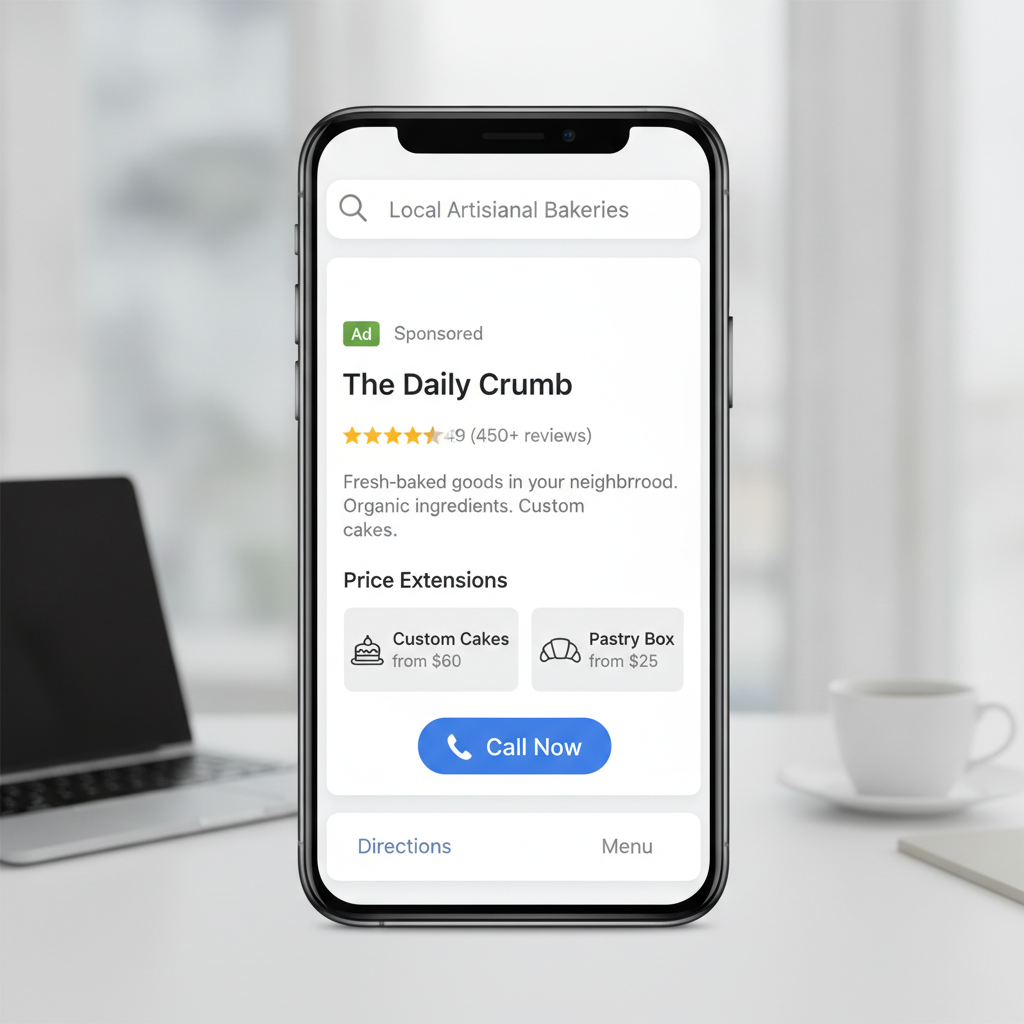
Google Ads price extensions drive qualified high-intent traffic by displaying your products, services, and exact starting costs directly on the search results page. Showing clear pricing upfront filters out unqualified clicks from users looking for cheaper options, ensuring your paid clicks come from buyers ready to transact.
When deploying google ads price extensions, structure your options in clear, distinct categories with accurate descriptions. For example, a commercial service business might list tiered service packages or starting diagnostic rates. This transparency builds immediate confidence, setting clear expectations for potential clients before they arrive on your website.
When should local businesses leverage call and location extensions?
Local service providers and brick-and-mortar storefronts should leverage call and location extensions continuously to capture immediate local intent. Location assets connect your campaign to your Google Business Profile, displaying physical addresses, store hours, and direct driving directions to searchers nearby.
For regional service sectors—such as local home services, law firms, or competitive regional markets like Houston advertising—call extensions allow users on mobile devices to phone your sales line directly from the SERP. This seamless action bypasses landing page navigation entirely, often resulting in higher lead conversion rates and shorter sales cycles.
ℹ️ Info
Automated assets can save time by drawing data directly from your landing pages, but manual control allows you to tailor calls-to-action specifically to current seasonal promotions, service line priorities, and specific customer segments.
How Do You Set Up and Optimize Ad Extensions for Maximum Impact?
Setting up and optimizing ad extensions involves defining clear promotional goals, mapping assets to specific ad groups, and continually reviewing performance metrics inside your account interface. Proper structural implementation guarantees that Google's algorithm has access to multiple asset options for every auction.
To optimize successfully, write distinct, engaging copy for each asset rather than repeating headline text. Ensure that every destination link leads to a highly relevant, mobile-friendly web page tailored to the specific asset's promise.
```
Campaign Account Structure
├── Account Level: Global Callouts & Business Logo
├── Campaign Level: Regional Location Extensions & Structured Snippets
└── Ad Group Level: Specific Sitelinks & Price Extensions
```
What is the step-by-step process to deploy assets across campaigns?
Deploying assets across your account follows a streamlined, methodical workflow designed for quick implementation and continuous refinement:
- 1Access the Assets Menu: Log in to your Google Ads dashboard, select "Ads & assets" from the left navigation panel, and click on "Assets."
- 2Select Asset Type: Click the blue plus (+) icon and choose the specific asset type you wish to create (e.g., Sitelink, Callout, Price, or Call).
- 3Determine Level: Choose whether to apply the new asset at the Account, Campaign, or Ad Group level based on how specific the information is.
- 4Draft High-Value Copy: Fill out all required fields, ensuring headlines, descriptions, and URL paths are distinct, engaging, and accurate.
- 5Schedule and Target: Set custom scheduling (such as running call extensions only during business operating hours) and save your asset.
What common pitfalls prevent extensions in Google Ads from showing?
The most common pitfalls preventing extensions from showing include low overall Ad Rank, poor asset relevance, overly restrictive policy approvals, and destination URL mismatches. Google's algorithm evaluates every auction individually and will only render assets if your predicted Ad Rank meets minimal performance thresholds.
Another frequent issue is text redundancy. If your sitelink text simply repeats phrases already present in your primary headline or callout extensions, Google's system may suppress the asset to avoid duplicative messaging. Regularly audit your active assets to ensure every text element provides unique, useful information.
Key Takeaways for Maximizing Asset Performance
To maintain a competitive advantage across your search marketing initiatives, remember these foundational asset management principles:
Assets expand real estate: Utilizing google ads assets increases visual presence on search results pages without extra cost.
Relevance drives Ad Rank: Well-matched assets raise Quality Scores, leading to improved ad placements and lower average CPCs.
Target high-intent features: Deploy google ads price extensions and call assets to pre-qualify leads before paying for the click.
Structure strategically: Combine account-level global assets with highly targeted ad group sitelinks for maximum context.
- Audit regularly: Continually refresh asset copy to match current inventory, seasonal offers, and marketing goals.
