

Ensuring that search engine crawlers efficiently discover, understand, and index your website is foundational to organic search success. For local businesses in Houston, growing enterprises, and ambitious entrepreneurs, managing how search bots interact with your domain directly impacts online visibility and customer acquisition. Two critical components form the backbone of this technical governance: the `robots.txt` file and the XML sitemap.
Overview: Controlling Crawl Efficiency and Indexation
A `robots.txt file` serves as an access control protocol that instructs search engine crawlers which directory paths or files they are permitted or restricted from requesting. Conversely, an `XML sitemap` acts as a definitive architecture blueprint, listing all priority canonical URLs to ensure complete discovery and rapid indexation. Working together, these technical files optimize your site's crawl budget, directing search bots such as Googlebot toward revenue-generating content while bypassing non-essential backend infrastructure.
"A clean robots.txt file combined with an error-free XML sitemap ensures search engines spend 100% of their allocated crawl budget on your most revenue-impactful pages."
What is a Robots.txt File and How Does It Work?
A `robots txt file` is a plain text file positioned in the root directory of a web server (e.g., `yourdomain.com/robots.txt`) that adheres to the Robots Exclusion Standard. It is the very first document an automated crawler requests when visiting a web domain. Through specific syntax rules, the file informs visiting software agents whether they have permission to access specific folders, files, or entire site sections.
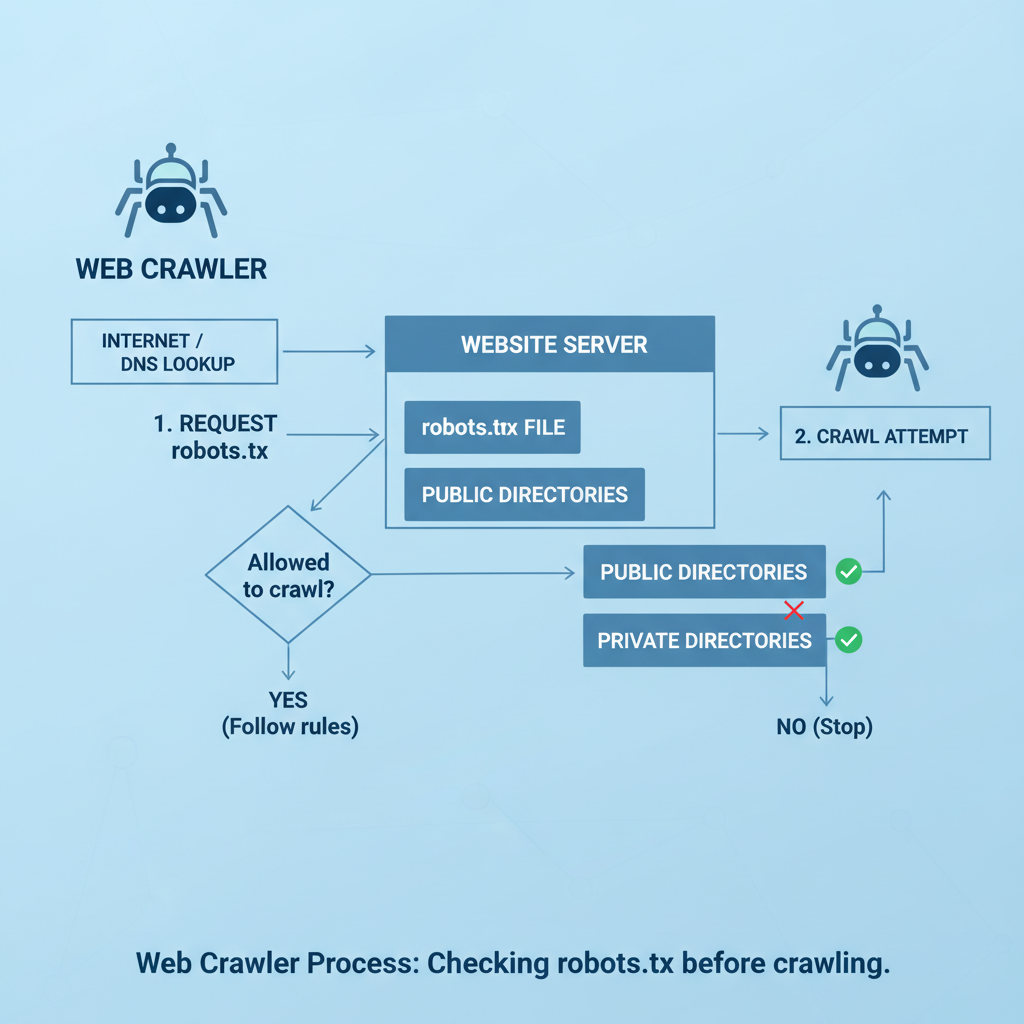
What is the purpose of a robots.txt file in technical SEO?
The primary purpose of a `robots txt` file is to manage crawl budget by preventing search engine crawlers from consuming server resources on non-public, duplicate, or resource-heavy pages. Crawl budget represents the total number of URLs search engines—such as Google or Bing—can and want to crawl on a website during a specific timeframe.
In practice, a growing business website often contains staging environments, user account dashboards, internal site search results pages, and shopping cart checkouts. If search engine bots waste crawl capacity on hundreds of dynamic user session links, they may delay crawling newly published service pages or blog updates. Blocking access to non-essential directories protects server bandwidth and ensures crawler focus remains on strategic assets.
How do you format directives like User-agent, Disallow, and Allow?
Formatting a `robots txt file` requires strict syntax rules consisting of user-agent lines paired with access directives. The standard framework uses three primary components:
`User-agent`: Specifies which search crawler the directive applies to. Using an asterisk (`User-agent: `) applies the rule universally to all web crawlers. Specifying `User-agent: Googlebot` targets rules exclusively to Google's primary web crawler.
`Disallow`: Indicates the directory or file path that the designated crawler must not request.
`Allow`: Explicitly permits access to a specific subfolder or file contained within a broader disallowed folder.
A typical standard configuration appears as follows:
```txt
User-agent:
Disallow: /admin/
Disallow: /checkout/
Disallow: /search/
Allow: /admin/public-assets/
Sitemap: https://www.yourdomain.com/sitemap_index.xml
```
In this structure, all `robots` crawlers are blocked from accessing administrative, checkout, and internal search paths, while access to a specific asset subfolder within the admin area is explicitly granted.
How does the noindex directive interact with robots.txt?
The `noindex` rule must never be included inside a `robots.txt` file because major search engines officially stopped supporting `noindex` directives within robots files in 2019.
To permanently exclude a web page from search engine result pages (SERPs), web developers must apply an HTML meta `robots` tag within the document head:
```html
```
Alternatively, an HTTP response header (`X-Robots-Tag: noindex`) can be served directly from the server.
A critical technical nuance to understand is that if a page is blocked via a `Disallow` rule in your `robots txt file`, search engine crawlers are prevented from accessing the page entirely. Because the crawler cannot download the HTML file, it cannot read the meta `noindex` tag placed inside the code. Consequently, if external websites link to that disallowed URL, search engines may still index the address based on external link context, displaying it in search results without a meta description snippet.
What is an XML Sitemap and Why is It Critical for Search Engines?
An `XML sitemap` is a structured document formatted in Extensible Markup Language (XML) that lists all valuable canonical URLs belonging to a web domain. Rather than requiring crawlers to find pages purely through hyperlinked page navigation, the sitemap directly provides search engines with a comprehensive catalog of your website's content layout.
🥧 Typical Crawl Budget Distribution on E-Commerce & Service Sites
What is a sitemap and how does it help search engine crawlers?
When business owners inquire about `what is a sitemap`, it is best defined as a digital roadmap that explicitly points search engine engines to pages intended for indexation. Beyond simple URL lists, an XML sitemap provides critical metadata about each URL, including:
- 1 `
`: The timestamp indicating when the page content was last updated. - 2 `
`: A guideline on how frequently the page content typically changes (e.g., daily, weekly, monthly). - 3 `
`: The relative importance of a URL compared to other pages on your own site (on a scale from 0.0 to 1.0).
For local service providers in Houston operating extensive websites—such as multi-location HVAC, legal, or commercial real estate firms—an XML sitemap guarantees that newly created local landing pages are surfaced to search engine crawlers immediately, eliminating delays caused by complex site architecture.
How do you create an XML sitemap using an XML sitemap generator?
Creating an XML sitemap can be efficiently managed using a specialized `xml sitemap generator` or through native automated functionality within modern content management systems (CMS).
To configure a reliable XML sitemap:
- 1 Deploy an automated generator: Utilize proven platforms or CMS plugins (such as Yoast SEO, Rank Math, or platform-native generators in Shopify and WordPress) that dynamically rebuild your sitemap whenever new content is published.
- 2 Filter included content: Ensure only 200 OK indexable canonical pages are included. Exclude 301 redirects, broken 404 pages, utility URLs, and pages carrying a `noindex` tag.
- 3 Enforce sitemap size limits: Adhere to official protocol standards established by Sitemaps.org. A single XML sitemap file must not exceed 50 MB (uncompressed) or 50,000 URLs. If your site exceeds these limits, deploy a sitemap index file that links to multiple sub-sitemaps (e.g., `post-sitemap.xml`, `page-sitemap.xml`).
How do you submit your XML sitemap to Google Search Console?
Submitting your XML sitemap directly to webmaster tools establishes a verified channel for search engines to process your site architecture and return detailed indexation feedback.
To submit your sitemap to Google Search Console:
- 1 Log in to your Google Search Console property dashboard.
- 2 Navigate to the Indexing section in the left sidebar menu and click Sitemaps.
- 3 Under the Add a new sitemap section, enter your sitemap file URL path (e.g., `sitemap_index.xml`).
- 4 Click Submit.
Once submitted, Google validates the file structure and displays real-time reporting regarding processed URLs, discovered items, and any structural warnings. Technical guidelines for proper file submission and indexation monitoring are systematically outlined in the official Google Search Central Documentation.
How Do Robots.txt and XML Sitemaps Work Together for Technical SEO?
While a `robots txt file` and an `XML sitemap` perform distinct functions, they operate as complementary pillars of a site's technical foundation. The `robots.txt` file defines access boundaries by instructing crawlers where they are not allowed to go, whereas the `XML sitemap` highlights destination targets by specifying where crawlers should focus their attention.
"Relying on robots.txt for security is a dangerous misconception; robots directives guide public search bots, but they do not password-protect sensitive web assets."
How should you reference your XML sitemap inside your robots.txt file?
Search engine crawlers automatically check the `robots.txt` file during their initial site discovery sweep. To ensure crawlers locate your primary sitemap without delay, insert an explicit absolute URL reference anywhere within your `robots.txt` file.
The standard syntax is:
```txt
Sitemap: https://www.yourdomain.com/sitemap_index.xml
```
Adding this single directive ensures that even search engines that have not yet been manually provided with your sitemap through webmaster tools can locate your complete URL structure immediately upon entering your domain.
What are the common pitfalls when managing crawl budget and indexation?
Conflicting commands between your `robots txt` file and your `XML sitemap` lead to indexing errors and degraded organic search performance.
💡 Tip
Technical SEO Best Practice: Always ensure that your CSS, JavaScript, and image assets are accessible to `robots` crawlers inside your `robots.txt` file. Restricting rendering assets prevents search engines from evaluating mobile responsiveness, layout shift, and Core Web Vitals performance.
Common implementation mistakes include:
Sitemap-Robots Contradiction: Including a URL inside your `XML sitemap` while simultaneously blocking crawler access to that exact path within your `robots txt file`. This creates an explicit instruction conflict that triggers Search Console errors.
Exposing Sensitive Directories: Using `robots.txt` as a pseudo-security measure to conceal sensitive directories. Because `robots.txt` is a publicly accessible file located at `/robots.txt`, listing hidden administrative paths reveals their locations to potential attackers. Password protection and server authentication must be used instead.
Indexing Non-Canonical Pages: Listing parameterized search URLs, paginated archives, or duplicated HTTP/HTTPS variants in your sitemap. Only final, primary canonical URLs belong in a sitemap.
📊 Indexation Performance Scores by Technical Setup Quality
How Should Local Houston Businesses Optimize Crawl Budget and Indexation?
For entrepreneurs and local business owners operating in competitive geographic markets like Houston, technical SEO optimization directly translates to localized market share. Ensuring search engines quickly index your core service locations, customer case studies, and primary contact hubs provides a distinct competitive advantage over businesses with slow or misconfigured websites.
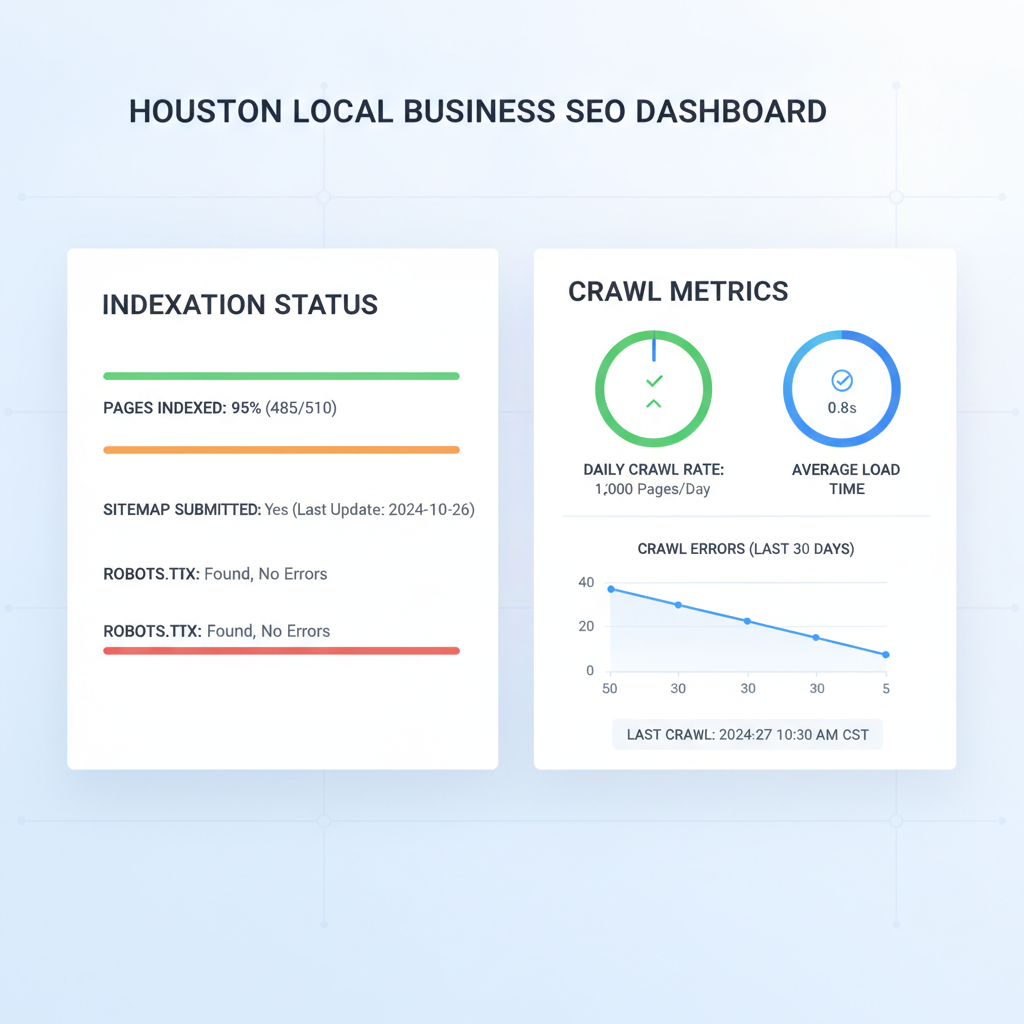
Which pages should local business websites block or exclude from indexation?
To maximize search visibility, local websites should strategically differentiate between high-value landing pages and operational utility pages.
Pages to permit and include in XML sitemaps:
Primary core service pages (e.g., commercial plumbing, legal representation, IT consulting).
Geographic service area landing pages (e.g., Houston, Sugar Land, The Woodlands, Katy).
Original blog posts, client testimonials, and localized case studies.
Primary contact and business location pages.
Pages to exclude via `noindex` or block via `robots.txt`:
Internal user login portals and client account dashboards.
Duplicate landing pages created for temporary paid pay-per-click (PPC) campaigns.
Thank-you and conversion confirmation pages (to prevent conversion tracking skew from direct organic entries).
Internal search results pages and staging/development subdomains.
How can businesses audit their technical setup for optimal visibility?
Conducting a quarterly technical audit prevents indexation drop-offs caused by unexpected CMS updates, plugin installations, or structural site changes.
Follow this systematic technical validation protocol:
- 1 Inspect the Robots File: Load `yourdomain.com/robots.txt` directly in a browser. Confirm that valid `User-agent` directives exist and that core CSS, JS, and image pathways remain unblocked.
- 2 Validate the XML Sitemap: Run your sitemap URL through an online XML validator to check for syntax errors. Verify that every listed URL returns a `200 OK` HTTP status code and contains an accurate `
` date stamp. - 3 Review Google Search Console Coverage: Check the "Pages" report within Search Console. Investigate any URLs categorized under "Blocked by robots.txt" or "Submitted URL marked 'noindex'" to resolve unintentional blocking errors quickly.
Summary: Essential Technical Takeaways
Maintaining an optimized technical framework ensures that your business website communicates clearly with search engine crawlers, protecting server resources while maximizing content reach.
`robots.txt` governs crawler access: Use it strictly to manage crawl budget and prevent search bots from requesting utility or administrative directories.
`noindex` controls page indexation: Apply HTML meta tags or HTTP response headers to keep pages out of search results; never rely on `robots.txt` to remove indexed pages.
`XML sitemaps` guide discovery: Maintain clean, dynamic sitemaps containing only 200 OK canonical URLs, and keep files updated via automated generation tools.
Eliminate directive conflicts: Cross-reference your sitemap against your `robots.txt` rules to guarantee search engines are never asked to crawl a page that is simultaneously blocked.
